First 30 days. Mistaken enrollments. Late enrollees. Qualified life events. Retroactive changes. Special enrollment requests. Swapping plans. New dependents.
We have set eligibility rules to ensure that all users are ERISA-compliant and accounted for within their stop loss contracts. These rules apply to all customers, and impact who can enroll on the plan and at what time we can allow their enrollment.
If errors occur during open enrollment, we have two tools to help correct errors which may be used during the first 30 days of the Plan Year.
What changes can I make in the first 30 days of the plan?
To fix mistakes on the original census, we have two available tools within the first 30 days:
- Mistaken Enrollment Tool
- Late Enrollee Tool
These tools disappear from your toolbox after the first 30 days of the plan, so be sure to carefully review your eligibility on your first and second invoices to catch and correct any errors.
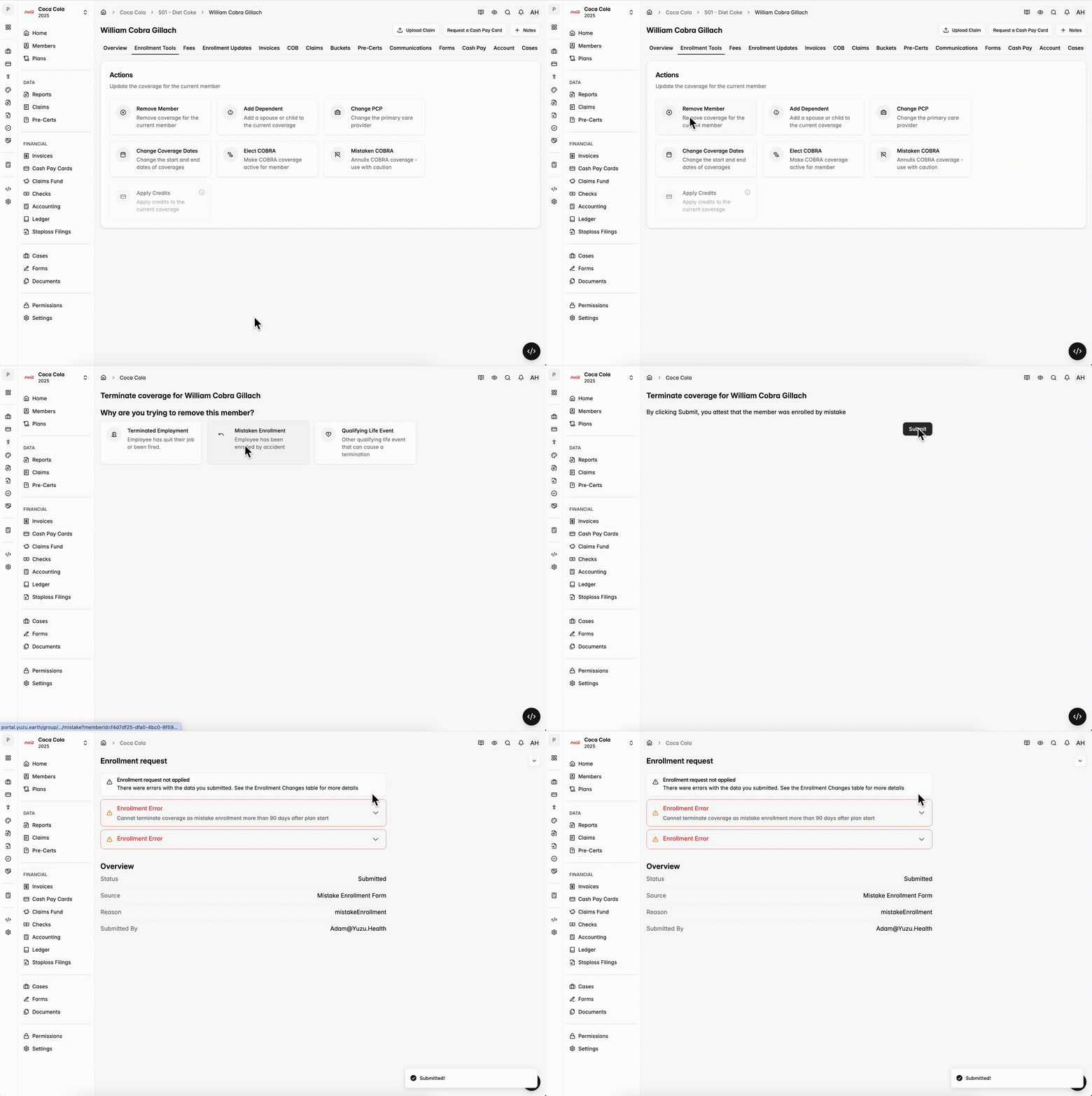
Mistaken Enrollment Tool
- Allows you to terminate members who were enrolled in error and should never have been on the plan.
- When you use this tool to terminate a member:
- The employer will be automatically credited back the member’s premium on the next month’s invoice (like all other retroactive terminations).
- Unlike other terminations, Yuzu’s COBRA flow is not kicked off when members are terminated through Mistaken Enrollment.
Late Enrollee Tool
- Allows you to add a member who should have been on the original census but was missed.
- When you use this tool to add a missed member:
- You will be automatically billed for the additional months of premium on your next invoice (just like any other retroactive addition).
- Unlike new employee additions, the member will not need to wait the waiting period.
- As such, this tool should not be used for new employees, only existing ones who intended to be on the plan.
How long can I make retroactive changes?
- Retroactive changes (both terminations and additions) are limited to 60 days.
- For Terminations — If a member’s coverage begins on August 1st, the latest possible date to retroactively terminate them back to their start date is October 1st.
- For Additions — If a member was meant to have coverage starting on May 1st, the latest you could add them would be July 1st to still have their coverage go back to May 1st.
How long can I add new dependents?
- New dependents must be added to the plan within 30 days of birth, adoption, or marriage. See how to add a member here.
What is a Qualified Life Event?
- A Qualified Life Event is any event that triggers a Special Enrollment Period where an Employee may enroll in the Plan, even if they declined to enroll during the initial open enrollment period.
- For more information on Qualified Life Events, please see the Eligibility For Coverage section of your Summary Plan Document (SPD). We typically see Qualified Life Events fall under 1 of 4 categories:
- Loss of Other Coverage
- Medicaid/Medicare Ineligibility
- Legal Mandate
- Part-Time to Full-Time Work
How do I handle Special Enrollment requests?
- Special enrollment requests (e.g., a member swapping plans, or moving from a dependent to a subscriber) can be completed without penalty in the first 30 days of the plan. Simply go through the Mistaken Enrollment flow for the member’s incorrect coverage, and then go through the correct flow to add them (either as a new hire or new dependent).
- After that point, they are approved on a case-by-case basis by emailing partners@yuzu.health.
NOTE: We require that all customers regularly update their enrollment - the employer should always be the source of truth regarding which members are eligible for the health plan.