General Invoicing Info
Invoices can be found on the far left side bar universal view or the left side bar group-specific view (Click into a group > left sidebar “Invoices”). Our invoices have each fee broken down by subscriber tier for maximum transparency.
General Processes
Level Health optimizes invoicing for simplicity, efficiency, and to enforce clear expectations. Constraints:
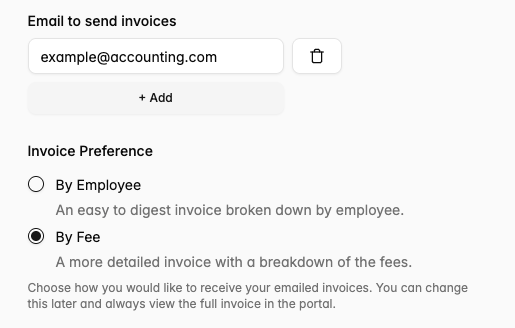
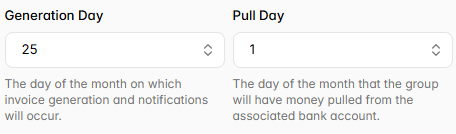
- Level Health defaults to generate invoices on the 25th of the month, and notifies the email addresses configured on the group’s settings under “Email to send invoices” (may be multiple emails). These emails do not automatically get access to the portal and do not receive any PHI. Groups have the option to allow for later invoicing and can configure this under the “Invoice Preference” section of the employer’s business details.
- Employers can have their invoice generated on either 5 days before the first of the month, the 1st of the month, or the 5th of the month.
- Level Health invoices by ACH pull. We do not allow other modes of paying invoices (no checks, no ACH push).
- Groups that want the security of ACH push supported can achieve a similar setup by creating a new bank account and having only the money available for your health insurance invoice in that account. Then connect this account to Level Health.
- Money is pulled from the account linked by the group, visible on the Settings > Banking tab.
- Level Health pulls by default on the 1st of the month. The way the ACH debit will appear on your account is dependent on which bank you have.
- Employers can have funds pulled for invoices any day the 1st-10th of the month.
- Funds will not be pulled until the next day after an invoice is generated and the employer is notified (we will always send over the invoice before we pull funds for that invoice).
Invoice Configuration
Invoices can be configured in the Settings tab for a group (e.g. https://portal.yuzu.health/group/ID/settings). One or multiple people on your team can get access to the email notifications on invoices. These people do not automatically have access to the portal, meaning you can separate Finance from HR team responsibilities by having Finance receive the relevant invoice emails.
In general we don't like to create invoices before 5 days prior to start of month because enrollment changes typically do come and change that invoice if you lock it too early. This means you’ll see the invoice for the upcoming month by the 25th of the current month.
Additionally, invoices can be broken down either “By Employee” or “By Fee” depending on the employer’s preference. This can also be configured in the group Settings.