Log into my.levelhealthplans.com:
Learn how to upload a claim and file for reimbursement.
Why upload a claim?
- To file for reimbursement for a service your plan covers (primarily through coordinated care).
- To have a service you paid for count toward your deductible or out-of-pocket maximum (uncoordinated care).
How do I upload a claim?
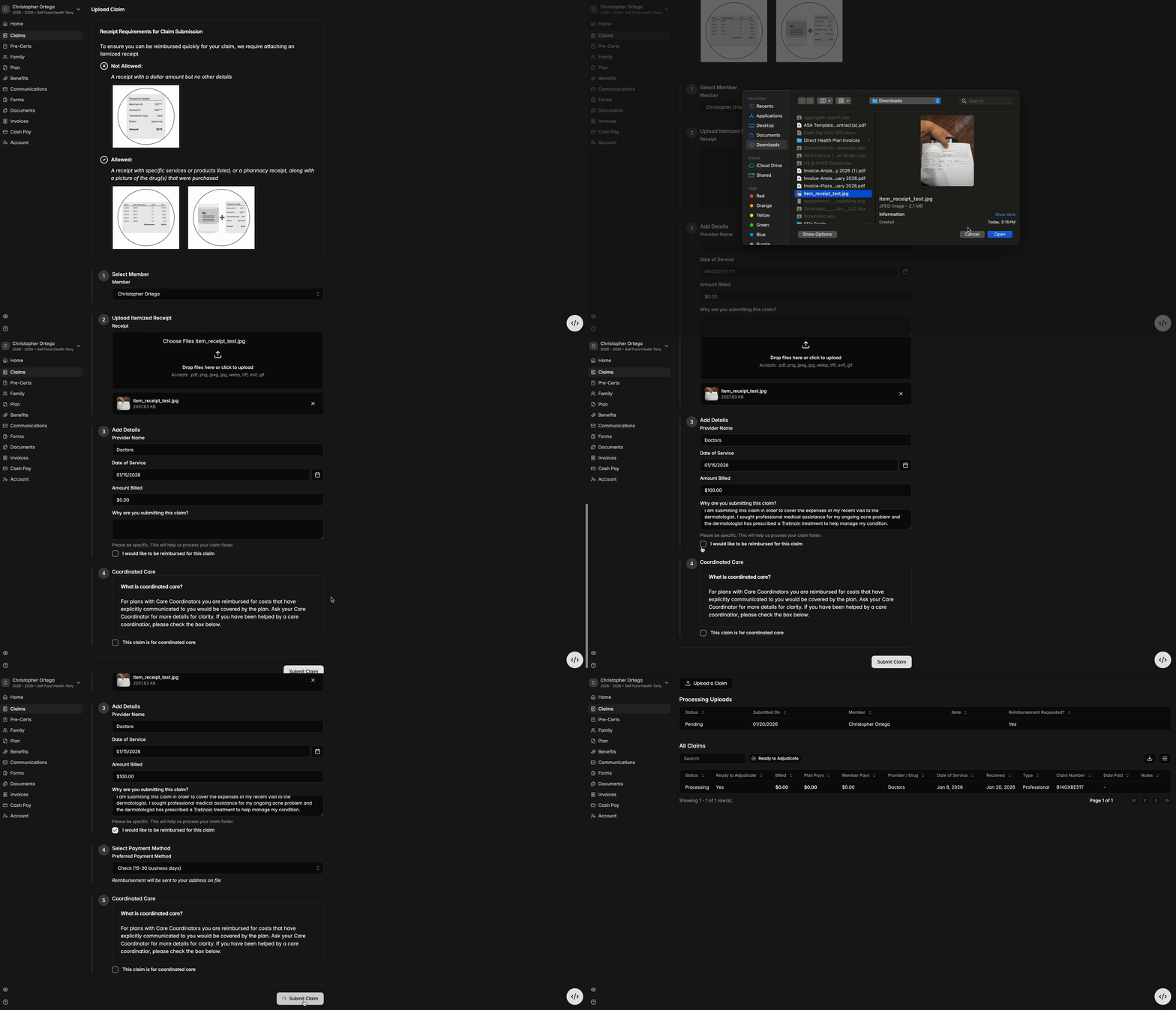
- To start, on the Claims tab, click ‘Upload a Claim.’ In the memo, include the provider name, date of service, amount billed, and reason for submitting the claim.
- An itemized receipt with service details or an Rx bottle label and a simple transaction receipt are required for the claim to be submitted. Please upload all information necessary to understand and assess the claim.
- Click the checkbox to indicate you've requested a claim reimbursement, then choose your preferred method of payment. This can be done via a linked bank account already established, or by connecting a new one through Plaid. See instructions on connecting banking here.
- Lastly, you will have the option to specify whether the claim pertains to coordinated care.
Please note: the demonstration video below illustrates using a check as the preferred payment method. If you select 'direct deposit' instead, as we recommend for quickest payment, you will have the option to link to a pre-existing bank account or you’ll receive prompt instructions to connect a fresh account through Plaid.